
For UK companies that sell to the public sector
Make your
strongest case.
Find tenders that fit your business. Turn your company’s evidence into a bid your team can stand behind.
Meritfold brings opportunity matching, cited responses and human review into one workspace.
Explore with sample data. No account or documents needed.
1. Bring your company evidence
Case studies, policies and certificates.
2. Draft with traceable claims
See the source behind a statement.
3. Review, approve, export
Your team checks the response and signs off.
- Find a Tender opportunities
- Claims linked to evidence
- Your team signs off
An interactive product example
See how an answer
connects to its source.
This fictional supplier example shows how source checking works. In your workspace, responses use your company’s reviewed documents.
Northfield is a made-up supplier. This walkthrough shows how Meritfold checks a statement against a document.
Example supplier response
DraftPolicy review
We review our equality policy annually.E25
The example document says annually. Check that the response says the same.
Supporting evidence
Equality, diversity and inclusion policy
policy_edi.pdf
Page 1 · Review schedule
Reviewed and approved annually by the board
E25Reviewed evidence · Fictional supplier
Claim supportedReady for your team to review.
In your workspace, the source would be your own reviewed document.
Follow the same path in the sample workspace: opportunity, evidence, response, review.
A clearer way to bid
Less starting over.
More moving forward.
Your best work is already in your documents. Put it to work on your next opportunity.
Look inside the workspace- 01
Bring what you can prove.
Add case studies, certificates and previous bids. Review the extracted evidence once, then reuse it across responses.
Your company evidence
Documents → candidate claims → your review
- Every claim keeps its source
- Your team approves what can be reused
- 02
Choose the work that fits.
Review a shortlist from Find a Tender, with reasons for, reasons against and evidence gaps. Make the bid or no-bid decision before drafting.
A decision you can explain
Capability + coverage + eligibility
- Fit reasons and risks in plain language
- A fit score is not a win prediction
- 03
Review a response with substance.
Draft from reviewed evidence. Resolve unsupported claims, check the requirements and give final approval before exporting an editable DOCX.
Your final decision
Draft → checks → human sign-off → DOCX
- Unsupported claims block export
- You submit through the buyer’s portal
Look inside
One workspace.
The whole bid in view.
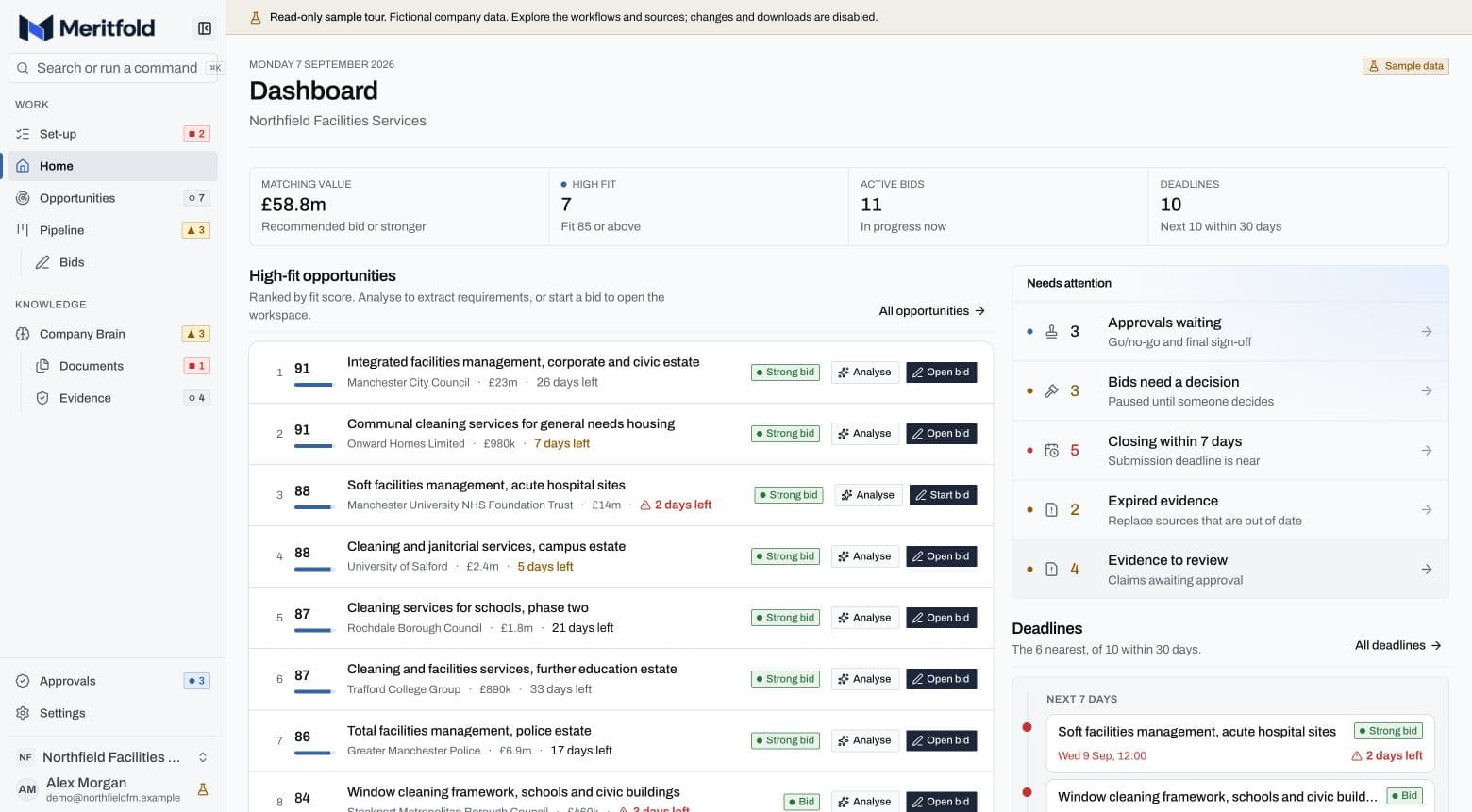
These are real product screens using Northfield, our fictional facilities management company. See how each part of the bid connects.
Pipeline value, high-fit opportunities and every submission deadline in one view.
Capabilities you can explore
Know what goes
into your next bid.
Follow the source, inspect the gaps and keep control of the final response. Explore these controls in the product tour.
Trace an answer to its source
See the document and passage supporting a draft claim.
Try source checkingSee what still needs evidence
Review unsupported claims and missing requirements before export.
Explore the productKeep the final decision
Your team approves the bid decision and the response. You submit to the buyer.
See the review stepStart with your next opportunity
Put it to work
for your business.
Create a workspace, add your company evidence and review the opportunities that fit. Start small and see the output for yourself.
Your starting point
Free to start.
No card required.
- Create your company workspace
- Add documents and review your evidence
- See opportunities scored for your business
Want to run a pilot?
We agree the scope and price in writing before any paid work. No annual commitment or auto-renewal.
Before you start
Fair questions.
Clear answers.
Can it make up company information?
AI can make mistakes. Meritfold drafts from reviewed evidence, checks claims against their sources, and blocks export when an unsupported claim remains. Your team must review the response and give final approval. Our evaluation page publishes the checks we have run and their limits.
What does it cost?
Creating a workspace and seeing scored opportunities is free, with no card required. Any pilot beyond that has a fixed scope and price agreed in writing first. There is no annual commitment or auto-renewal.
What can we upload?
PDF, Word, Excel, PowerPoint, CSV and plain text: case studies, certificates, policies, past bids and CVs. Start with the documents that best demonstrate your work. Scanned documents without a text layer cannot be read yet.
Who can access our company documents?
Your organisation's data is isolated in the database. Documents are processed by the AI services described on our security page. You can export your workspace; contact us to arrange permanent deletion. Review the security and privacy pages before uploading sensitive material.
Where do opportunities come from?
The UK's official Find a Tender service, checked every 15 minutes for new and changed notices. Your shortlist shows fit reasons and risks. A fit score is not a prediction of winning, and eligibility still needs your review.
Does Meritfold submit tenders automatically?
No. Your team makes the bid or no-bid decision and gives final approval. Meritfold exports an editable DOCX; you submit it through the buyer's portal.
Can we look around before adding our documents?
Yes. The product tour shows the real interface with Northfield, a fictional facilities management company. Where the sample workspace is available, you can explore it without creating an account or uploading documents. Your own workspace starts with your company's information.
Your next bid starts here
Bring your evidence.
Make your strongest case.
Give your team a clearer path from the right opportunity to a response they can stand behind.
Free workspace. Your team stays in control.